

Agent Node
Flow builder (fixed scripts). For most automations, use AI Agents: you describe what you want and the agent handles the conversation. Use the flow builder only when you need an exact, step-by-step script, for example: send message X, wait for the reply, then send message Y. When to use which.
The Agent node brings advanced AI capabilities to your bot with access to tools and knowledge bases, enabling complex problem-solving and information retrieval capabilities.
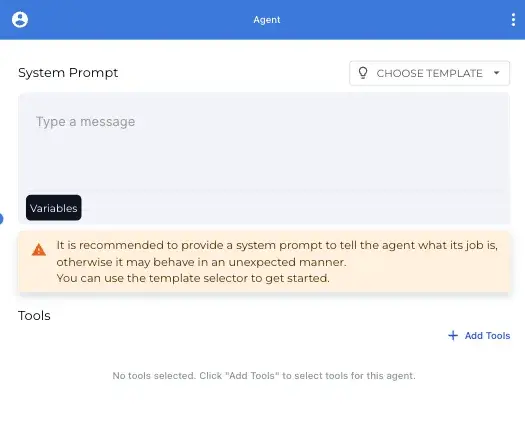
Overview
Agent nodes empower your bot to:
- Access and search knowledge bases for relevant information
- Use multiple tools to accomplish complex tasks
- Generate contextual, knowledge-grounded responses
- Answer detailed questions using your business data
- Handle complex customer inquiries autonomously
Key Concept: Autonomous Operation
Unlike other node types, Agent nodes are designed to operate autonomously:
- They don’t “exit” to other nodes
- They handle entire conversations independently
- They use their tools to complete tasks without needing to connect to other nodes
- They represent an endpoint in your flow, not an intermediate step
This autonomous design makes Agent nodes powerful endpoints in your conversation flows, capable of handling complex interactions without requiring additional nodes.
Configuration Options
System Prompt
The system prompt defines the agent’s role and instructions:
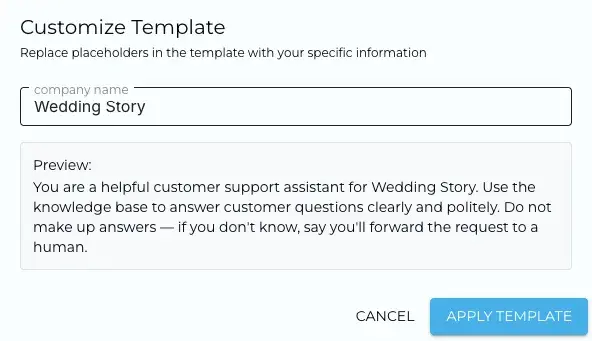
- Write a detailed prompt that explains the agent’s purpose and constraints
- Use the template selector to choose from pre-built templates for common roles
- Customize templates by replacing placeholders with your specific information
- The system prompt is not visible to users but guides the agent’s behavior
Template Selection
You can choose from various pre-built templates for common agent roles:
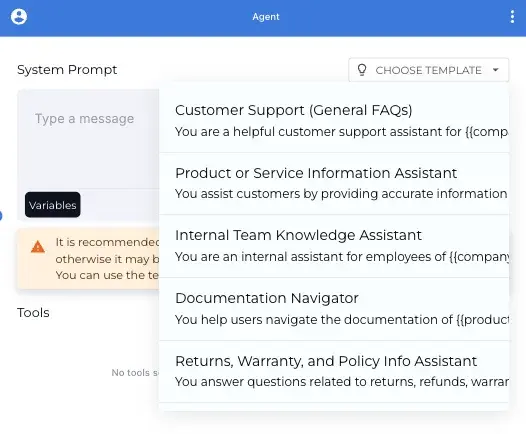
Available templates include:
- Customer Support (General FAQs)
- Product or Service Information Assistant
- Internal Team Knowledge Assistant
- Documentation Navigator
- Returns, Warranty, and Policy Info Assistant
Tool Selection
Configure which tools the agent can access to complete tasks:
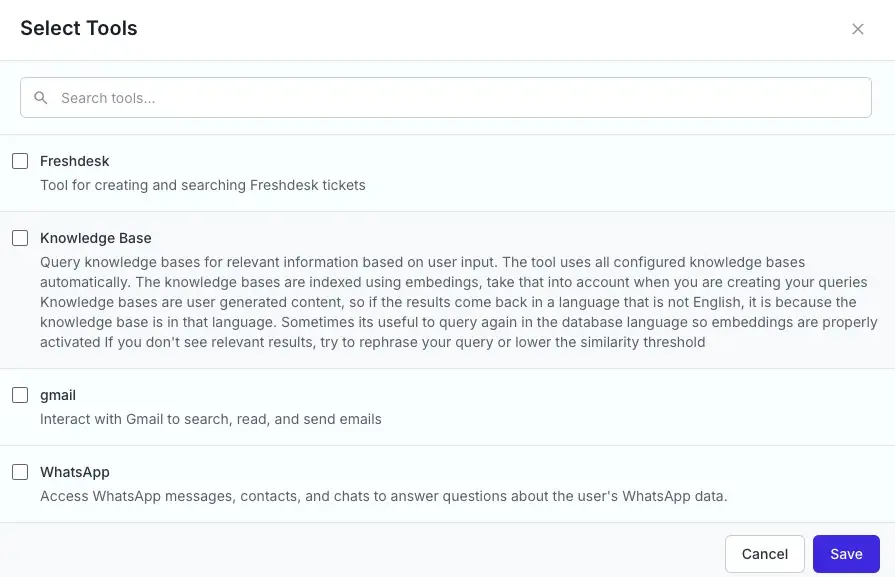
Available tools include:
- Freshdesk: Create and search Freshdesk tickets
- Knowledge Base: Query knowledge bases for relevant information
- Gmail: Search, read, and send emails (for internal assistants)
- WhatsApp: Access WhatsApp messages and contacts (for personal assistants)
Each tool extends the agent’s capabilities in different ways, allowing it to access specific data sources or perform particular actions.
Knowledge Base Integration
One of the most powerful features of the Agent node is its ability to access knowledge bases:
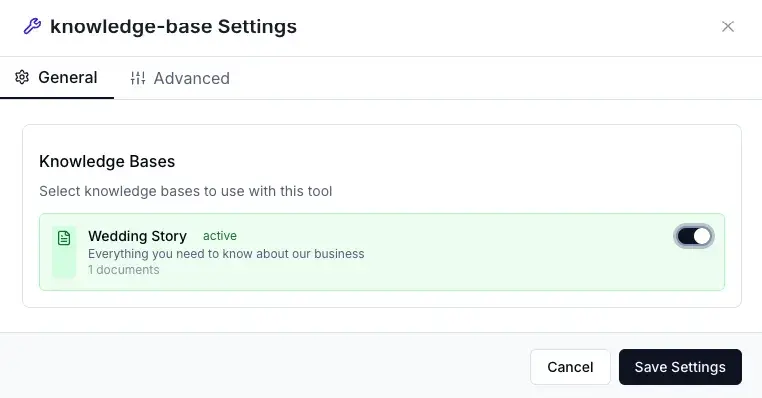
- Select which knowledge bases the agent can access
- The agent will automatically search these knowledge bases when answering questions
- Results are ranked by relevance to the user’s query
- The agent can cite specific documents when providing information
Customer support with the Agent node
You can build a support assistant by placing an Agent node at the end of your flow and enabling the Knowledge Base tool with your support documentation. For new support automations, use AI Agents instead.
Common Use Cases
- Customer Support: Answer product questions and troubleshoot common issues
- Internal Documentation: Help team members find information in company documentation
- Product Expert: Provide detailed specifications and compatibility information
- Policy Advisor: Explain company policies and procedures accurately
- Knowledge Worker Assistant: Retrieve and synthesize information from multiple sources
Best Practices
- Be specific in your system prompt: Clearly define the agent’s role and limitations
- Choose the right tools: Only enable tools that are relevant to the agent’s purpose
- Maintain comprehensive knowledge bases: The agent’s effectiveness depends on the quality of your knowledge base
- Test with various questions: Ensure the agent handles different types of inquiries correctly
- Update knowledge regularly: Keep your knowledge bases current so the agent provides accurate information
- Monitor and refine: Review agent conversations to identify areas for improvement
Example Implementations
Customer Support Agent
System Prompt: You are a helpful customer support assistant for Wedding Story. Use the knowledge base to answer customer questions clearly and politely. Do not make up answers — if you don't know, say you'll forward the request to a human.

Tools: Knowledge Base
Knowledge Bases: Wedding Story documentation, Product catalog, FAQs
Internal Documentation Assistant
System Prompt: You are an internal assistant for employees of [company]. Your role is to help team members find information quickly in our documentation.

Tools: Knowledge Base, Gmail
Knowledge Bases: Internal policies, Technical documentation, Process guides
Credit Usage
- Agent nodes use 1 credit per AI model call, and one reply can take several calls
- For detailed information about credit costs and examples, see the Credits & Usage guide
Notes and Limitations
- Agent performance is heavily dependent on the quality and comprehensiveness of your knowledge bases
- For optimal results, maintain well-organized and up-to-date knowledge bases
- Consider privacy implications when enabling email or messaging tools
- The agent works best with clear, specific questions
- Very complex or ambiguous queries may require human intervention
- Multiple short exchanges may be more effective than very long, complex questions